
Skip to content
  • Home
  • About
  • Contact
  • Page
  • ​Master SEO Tactics
  • Top 9 Finance News Websites Ranking
wikifx

wikifx

  • Home
  • About
  • Contact
  • Page
  • ​Master SEO Tactics
  • Top 9 Finance News Websites Ranking
  • Toggle search form
  • Paysafe’s viafintech partners with banking-as-a-service platform Solarisbank forex news
  • Court finally terminates CFTC case against JAFX forex news
  • Swedish regulator imposes SEK 14 million fine on ClearOn forex news
  • NZ regulator launches legal action over insider trading in Pushpay shares forex news
  • CMC Markets reports transactions in its shares by CFO and Deputy CEO forex news
  • FX week in review: Liquidity.net launch, UEFA Europa sponsor, results from ETX, CMC, Equiti, Admirals forex news
  • European Commission welcomes agreement on DLT regime for market infrastructures forex news
  • City Index offers clients to trade its Remote Economy index forex news

MT5 mobile terminals now allow subscription to trading signals

Posted on 2022-02-25 By admin No Comments on MT5 mobile terminals now allow subscription to trading signals

MetaQuotes has enabled traders to use their smartphones to copy trades of professional traders. The MetaTrader 5 mobile terminals for iOS and Android now feature a Trading Signals section allowing traders to subscribe to any signal.

Traders no longer need a desktop computer to perform copy trading. Choose the right signal, subscribe to it and copy trades around the clock. With a mobile device, you can manage signal settings and open positions. However, you need a virtual hosting for continuous operation.
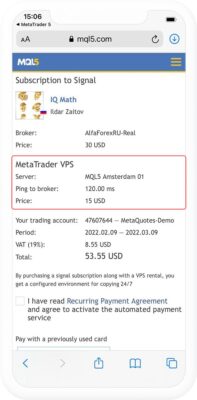
That is why, MetaQuotes has added the ability to rent MetaTrader VPS on a monthly basis. Copying is done at a remote terminal. Everything is automated. You do not need to connect and configure anything.

How it works

  1. Launch your MetaTrader 5 mobile terminal and select Trading Signals in the Settings.
  2. Enter your MQL5.com account login and password. If you do not have an account, create a new one.
  3. Select the appropriate signal from the list. See our step-by-step instruction if you have any questions.
  4. During the payment, USD 15 will be added to your purchase amount. This is the minimum payment for the virtual hosting, which is necessary for the signal to work continuously. You can pay for your purchase by credit card, as well as via PayPal, Apple Pay or UnionPay.
  5. After the payment, you are taken to the signal copy settings page. After setting the necessary values, you will need your MQL5.com account and trading account passwords. The trading account password can be found in the trading platform mailbox. Just look in the relevant section.

To complete the setup and activate the signal, click Copy Trades. All deals copied from the signal provider also appear in the Trade section to allow easy management.

forex news Tags:forex-news

Post navigation

Previous Post: Russian c-bank says all bank cards continue to work normally in Russia
Next Post: FCA issues final notice to Finablr

Related Posts

  • eToro adds 90 new assets to its lineup of investment instruments forex news
  • Broadway strengthens leadership team with key promotions forex news
  • CME outlines new Exchange Personal Trading Policy rules forex news
  • The Economic Impact of Achieving Net Zero by 2050 forex news
  • Fintech software provider Genesis hires Billy Morris as CFO, opens Dublin office forex news
  • DOJ stands behind testimony of ex-Morgan Stanley trader in spoofing case forex news

Leave a Reply Cancel reply

Your email address will not be published. Required fields are marked *

Recent Posts

  • EUR/USD Holds Near 1.05 as Fed, ECB Policies Shape Market Sentiment
  • Gold Prices Hold Steady Amid Global Economic Uncertainty
  • Australian Dollar: How RBA Policies, Commodity Prices, and Global Tensions Are Shaping the AUD’s Market Performance
  • EUR/USD: Understanding the Currency Pair’s Trends
  • USD Under Pressure: Navigating Economic Data and Global Uncertainties

TAG

Axiory Review 2022 B2B B2Broker News Basic Forex Knowledge broker brokers brokers in the UK Brokersview Broker tools CFDs coin News cryptocurrency Cryptocurrency News Crypto News dogecoin FCA news finance forex forex-news Forex Broker Forex Brokers Forex Demo Account Forex market forex news forex scams forex time Forex trading fx fxtrader fxtrading Global Forex Gold Analysis HotForex InstaForex LiteForex Review 2022 markets work MT4 MT5 news OctaFX Review Samtrade FX South Africa trade Forex traders Trading Forex
  • HKEX to proceed with launching Derivatives Holiday Trading in April 2022 forex news
  • HK watchdog bans former StanChart relationship manager forex news
  • One article Quickly understand the foreign exchange market forex news
  • Your Bourse releases FIX API solutions for MT4 and MT5 brokers forex news
  • Eurex, Korea Exchange to expand tradable product range forex news
  • CFTC seeks $5.8M in restitution from Long Leaf Trading Group forex news
  • Retail FX broker shares hit hard by market turmoil: NAGA.com -15%, Swissquote -5%… forex news
  • INFINOX adds MT5 to its social trading platform IX Social forex news

Copyright © 2026 wikifx.

Powered by PressBook News WordPress theme